When a Notification Steals the Thread
A notification interruption can break your train of thought. Sort urgent alerts from routine ones, then use a clear cue to resume without restarting.
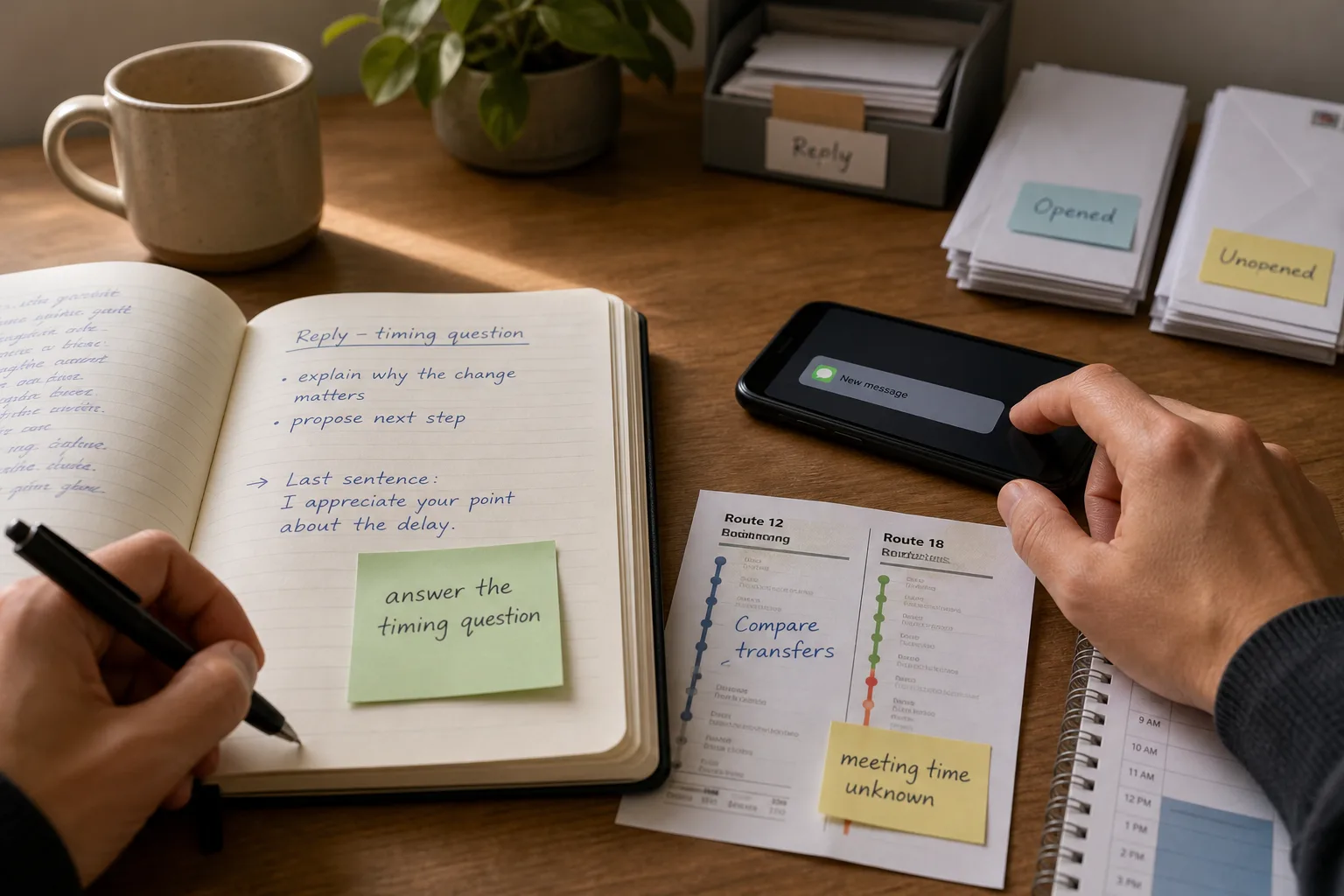
You are halfway through writing a reply when your phone lights up beside the keyboard. A notification interruption can leave you unsure whether you were answering a question or softening the tone. The first task is not to recover every detail; it is to decide whether the alert changes what deserves your attention.
That distinction keeps the interruption from taking over. Some alerts call for a timely response, while others are simply new activity. Once you have sorted the alert, a small trace of your unfinished work can help you return without starting again.
Sort the alert before opening a new thread
A banner signals that something happened, not that you must act at once. A calendar reminder, a message about a changed plan, and a group chat reaction may appear in the same place while asking for very different responses.
Use a brief pause to classify the alert. Do not inspect your device while driving, handling hot cookware, or doing another task that needs your full attention. If the task cannot be paused safely, leave the phone alone until it can.
- Look for an immediate safety concern. If the alert clearly points to danger, stop the task when it is safe and contact the appropriate person or service; if it does not, continue to the next check.
- Look for a changed commitment. If the message changes where or when you must be somewhere, note the change and adjust your plan; if it does not, leave the commitment as it stands.
- Check whether someone is waiting for your decision. If a person cannot proceed without your answer, send only the narrow response needed when it is safe; if they can proceed, defer the conversation.
- Notice whether the alert is informational. If it reports activity without asking for action, dismiss it or leave it unopened; if it contains a request, mark the request for a deliberate stopping point.
- Check the state of the task you paused. If it is at a safe stopping point, make a brief note before switching; if it is not, finish the immediate safe action first.
- Check whether the alert’s source is one you rely on for urgent contact. If it is, assess it at the next safe opportunity; if it is not, leave it for a planned message-checking pause.
These checks separate urgency from visibility. A sound, badge, or banner may be hard to ignore, but it does not by itself decide what should happen next.
Leave a visible cue for the task you paused
Returning is easier when the task itself shows where you stopped. A short note can capture a question, a next action, or an unfinished comparison; it does not need to preserve every thought that came before.
Think of the cue as a bookmark rather than a copy of the book. It should point to the next useful move, not send you back through everything you have already done.
Leave a cue in a draft
At a natural pause, add a private note such as “answer the timing question” or “explain why the change matters.” When you return, read the last sentence and the cue together, then write the next sentence that fulfills that purpose.
Leave a cue during a household task
Make the current state visible rather than relying on memory. With mail, for example, keep opened envelopes in one stack and unopened ones in another, and place any item requiring a reply in a separate spot. On return, those separate piles show what remains without forcing you to repeat the sorting.
Leave a cue beside a decision
Write down the specific factor you were comparing, such as a route’s transfer or a meeting time. This keeps the returning question narrow instead of reopening every option you considered.
What should you do after a notification interruption?
What if the alert may involve immediate safety?
Do not rely on the banner alone to judge what is happening. Finish or stop your current task safely, then use the appropriate contact or service if the message indicates an immediate danger.
What if you opened a message and lost your place?
Close the message once you know whether it needs action now. If it can wait, leave yourself a short cue about the reply and use the visible state of your original task to resume.
Should you silence every notification?
Not necessarily. Some people rely on calls, family messages, or appointment reminders, while other alerts can wait; choose settings that fit the obligations you actually have.
How can you reduce interruptions during focused work?
Move the phone out of direct sight, silence channels that do not need prompt attention, or set a routine time to check messages. If someone may need to reach you urgently, decide which contact methods should remain available.
Work through an interrupted choice with a concrete cue
Imagine you have a printed bus schedule, two route options, and a meeting whose start time may change. You have written “compare transfers” beside the routes when a message says the meeting time is still unsettled. You note “meeting time unknown” on the schedule rather than choosing a route.
Next, you check the comparison already on the page: one route has a transfer and the other is direct. Because the unresolved meeting time could affect which route fits, you leave both options open and place the schedule beside your calendar. When the time is confirmed, you compare the routes against it and choose; the visible note tells you exactly why the decision was paused.
The point is to preserve the thread, not to force an answer while attention is elsewhere. A useful cue names the interruption’s effect and the next action, so returning does not require rebuilding the whole decision.
Choose notification controls that fit your obligations
Notification settings differ across devices and software versions, and labels can change. On Apple devices, Focus settings can be used to manage which alerts are allowed during a selected mode. Android devices commonly offer Do Not Disturb and app-specific notification controls, but the available options and names vary by manufacturer and version. Check the settings on your own device before depending on a particular control.
Think in terms of channels rather than an all-or-nothing switch. A calendar alert may help you meet a commitment, while a group chat reaction may be easy to defer. If you silence a channel, account for anyone who may need another way to reach you about an urgent matter.
When a notification interruption breaks your train of thought, first decide whether it changes what needs attention. Then leave or follow a small, visible cue that tells you where to resume; that is often enough to keep one alert from becoming a full restart.